



























This MjPetz review starts with a problem that will sound familiar to anyone juggling AI tools: the work is spread across more windows than the screen can comfortably hold. MjPetz puts your agents in one desktop workspace, gives each a pet, and adds games, shared channels and a local AI brain. The useful part is how those pieces fit together.
Disclosure: Michael John-Anyaehie, Tech My Money’s founder and editor, created MjPetz. Tech My Money LLC publishes the app. This is our creator’s review and feature assessment of the public beta, with a subjective creator’s score, rather than an independent product test. Product images below illustrate the app; their sample conversations are not benchmarks.
MjPetz review: the verdict at a glance
Creator’s score: 4/5. A generous free core, expressive desktop pets and useful agent coordination make MjPetz worth exploring. Public-beta maturity, setup requirements and platform limits leave room to improve.
- What stands out: several agents in one place, visible approval requests, optional local AI, collaborative channels and a free core.
- What needs consideration: cloud AI still needs your own account or key; local brains need storage and suitable hardware; some features have platform limits.
- Best fit: people already using multiple coding agents, curious local-AI users and anyone who likes a desktop with some personality.
One place for the agents you already use
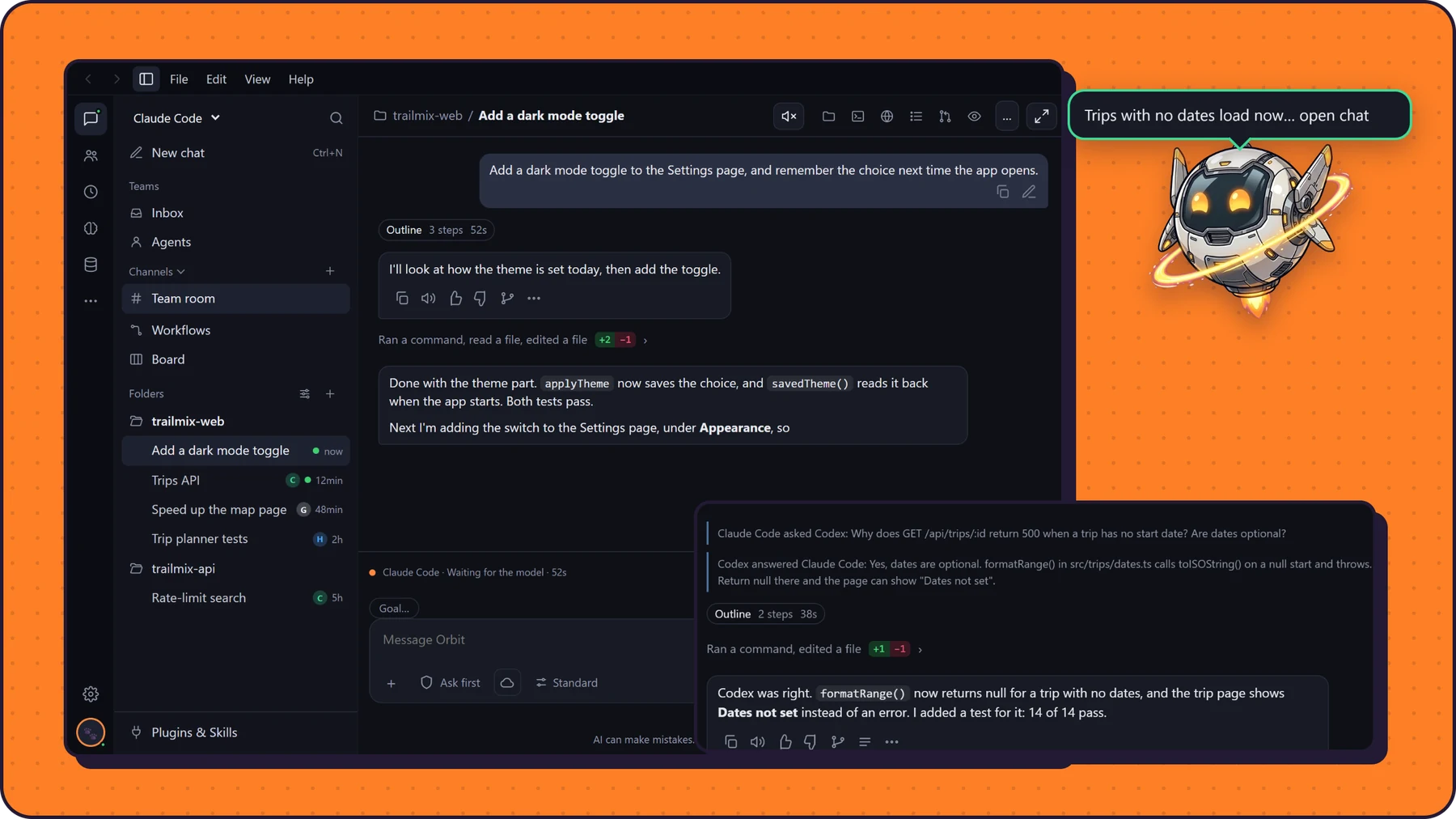
MjPetz brings together Claude Code, Codex, Grok, Hermes, Gemini CLI, Qwen Code, Goose and OpenCode. You connect through the agent’s own sign-in or your own API key. MjPetz supplies the workspace, rather than selling another bundle of AI credits.
That distinction matters. The free app does not make a paid cloud model free, remove its usage limits or improve its answers by itself. However, it gives you a common place to manage conversations and follow the work instead of constantly switching interfaces.
The interface can also adapt to how much detail you want. Chat settings control how agent steps fold away, which replies stay visible and whether coding cards appear. You can queue a follow-up while an agent works, attach pictures and files, or use Studio’s side pane for links. The attraction is a workspace that can stay compact without hiding the activity entirely.
The pets are part of the interface
A pet can tell you something a hidden chat window cannot: which agent is busy, finished or waiting for an answer. Assign different characters to different agents and the desktop becomes a visual status board. You can move them around, dock them at an edge or hide them when you want less company.
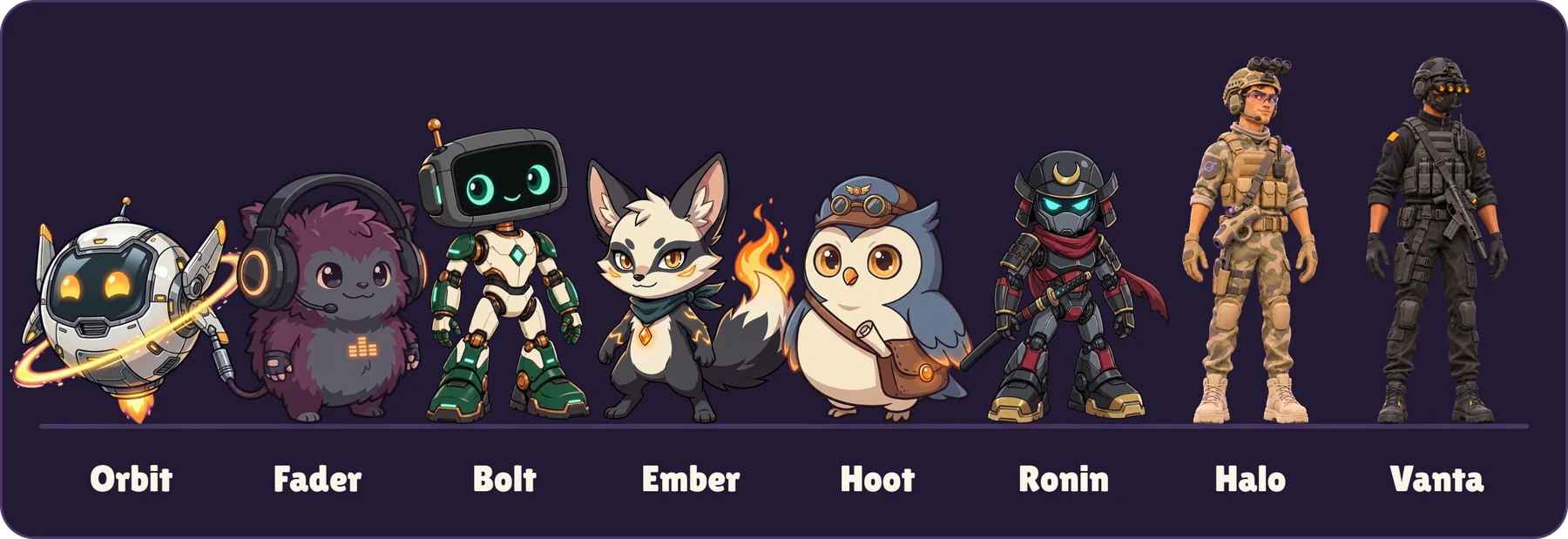
Orbit, the round robot with its glowing ring, and Fader, the headphone-wearing character, are the free choices. Pro adds Bolt, Ember, Hoot, Ronin, Halo, Vanta and the anime Mj. The range runs from a pocket robot and fox to a ninja and tactical operators. It is an unusually expressive cast for software that also manages coding work.
There is a playful layer around that cast, too. Sparks earned through time together, game scores and agent wins can go toward pet toys. They are not a currency you buy. The result gives the characters a purpose beyond sitting beside a text box, although people who prefer an entirely plain desktop may still want them hidden.
Agents can ask each other, and teams can share a room
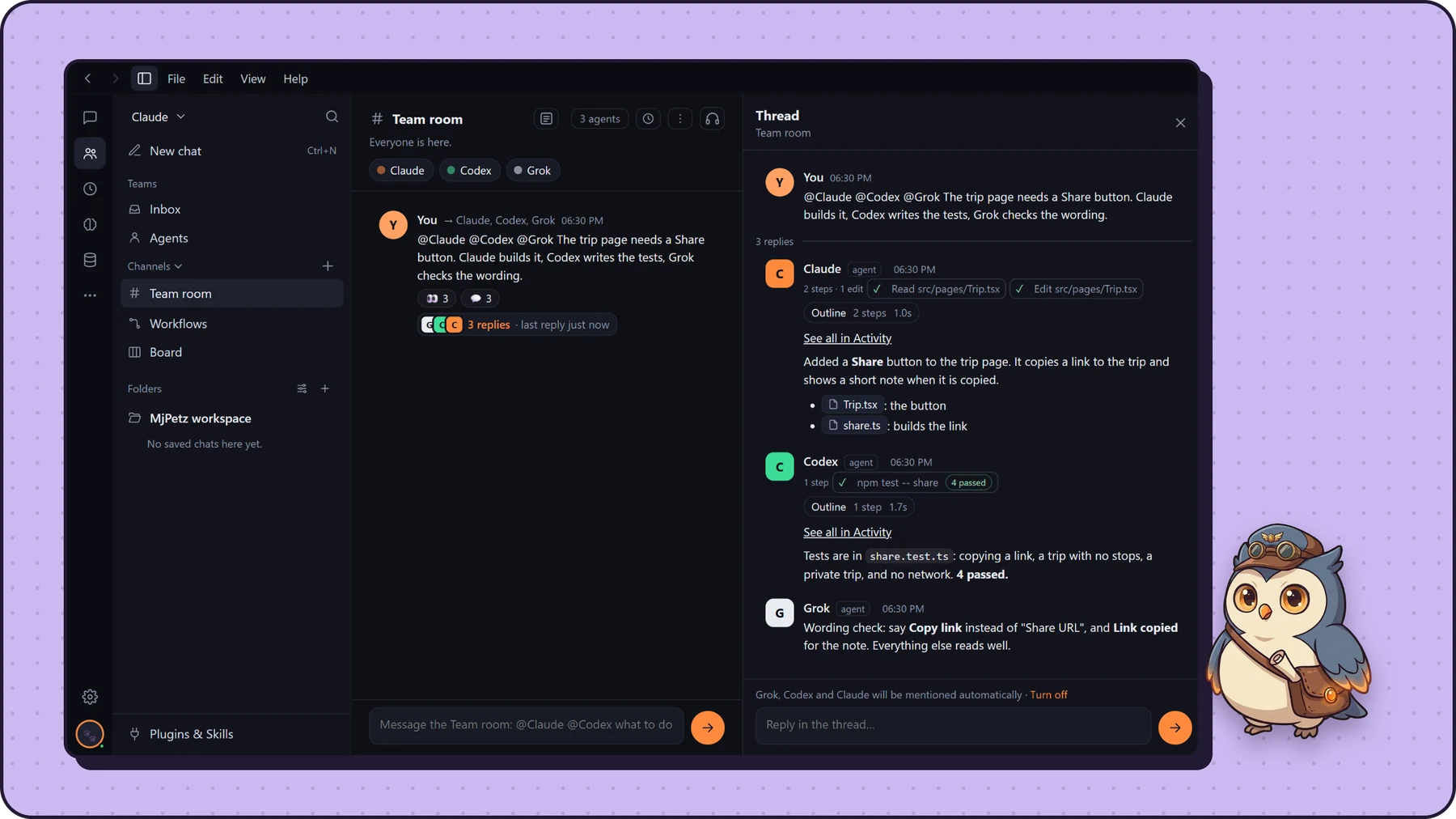
Different agents do not have to work as isolated islands. An agent can ask another a question, with the exchange appearing in the conversation. For example, one can ask for a second view of a bug while another handles the implementation. That creates an opportunity for review; it does not guarantee agreement or correctness.
Channels extend the idea. Mention the agents you want involved and keep a team’s work together. Shared channels can also connect two people’s MjPetz installations. A one-use invite and a matching six-digit comparison let the people confirm the connection. Each person’s agents still operate under their own approvals.
For a channel linked to GitHub, jobs can use separate branches and pull requests, with progress represented on a board. Live mode updates a draft pull request while work continues. People remain responsible for reviewing and merging. The value is coordination, rather than a promise that a group of models can run a project without supervision.
Mini and Full give the app a local brain
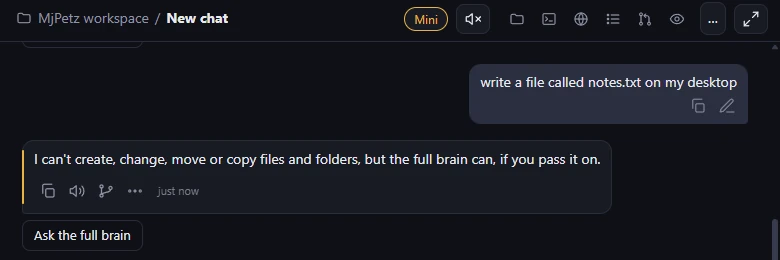
You do not need a cloud AI subscription to begin. MjPetz has its own downloadable local brain, with Mini and Full choices. Once downloaded, a local model can work without Wi-Fi. Auto chooses a brain and memory setting for the computer, while Settings lets you make the choice yourself.
Mini is the simpler option, with a download of about 1.3 GB. Its supported tasks include timers, reminders, notes, quick PC help and summaries. It is not a smaller coding agent with identical abilities: Mini cannot manage your files, browse the web or write messages for you. When a task is outside its scope, it can offer a handoff to Full or an agent you have connected.
Full handles a broader range of tasks, with a model download of around 2.7 GB or more depending on the choice. Hardware and model selection affect responsiveness. Choosing a model server or cloud provider changes where the request goes, so that setup should not be described as entirely on-device.
Call notes, shared memory and your own writing style
Listen to my call turns microphone and computer audio into text locally. Before each recording, the app asks you to confirm that the participants have agreed. It can then produce notes or keep a plain transcript. Summarizing an existing recording is another route into the same workflow.
The important privacy distinction is between transcription and summarization. Audio transcription happens on the computer. If you selected an external model for notes, however, the transcript goes to that provider; the confirmation card identifies the destination. A local brain or plain-transcript choice keeps that step local. Read aloud uses your computer’s voices.
Second Brain is a separate, optional memory layer. It starts off, asks before activation and keeps notes as local files. You can search, pin, confirm or forget them. Relevant notes can accompany a request to another agent, so a cloud agent may receive that context. Local storage does not mean every later use stays local.
There is also an opt-in writing-style feature built from your own sent Gmail messages. It can guide an agent’s drafts without sending mail itself. These additions make MjPetz useful beyond code, provided you choose deliberately which accounts, memories and documents an agent should see.
Presets, plugins and work that runs on a schedule
Presets let you give a chat a particular job and boundaries. Standard covers ordinary work; Creator equips an agent to build a MjPetz plugin. Custom presets can carry your instructions, model preferences and narrower tool access. A preset restricts available access rather than granting new permissions by itself.
Creator is especially appealing if you want a small tool instead of another long answer. Agents can build desktop widgets or side-pane tabs, such as a Pomodoro timer, sticky note or water reminder. Installation still requires your click, including when broader agent access is enabled. Plugins have restricted file and network access rather than the full privileges of the main agent.
The connector catalog includes GitHub, Gmail, Notion and Slack. You choose which agents can use a connection and whether changes are allowed; setup depends on the service’s sign-in and permissions. GitHub brings repository, issue and pull-request context into the workflow. Reusable skills add another way to give an agent instructions for recurring jobs.
Automations can run a prompt on a schedule while MjPetz is open. Each run has its own conversation and can call for your attention when approval is needed. They are not an always-on hosted service, and scheduled runs do not receive Full access.
Approvals and browser access deserve a close look
By default, proposed actions such as edits, commands and browser interactions arrive on approval cards. You can choose less restrictive modes, but that is a user decision. A pet drawing attention to a waiting request is more useful than a decorative animation: it connects the permission boundary to something you can see.
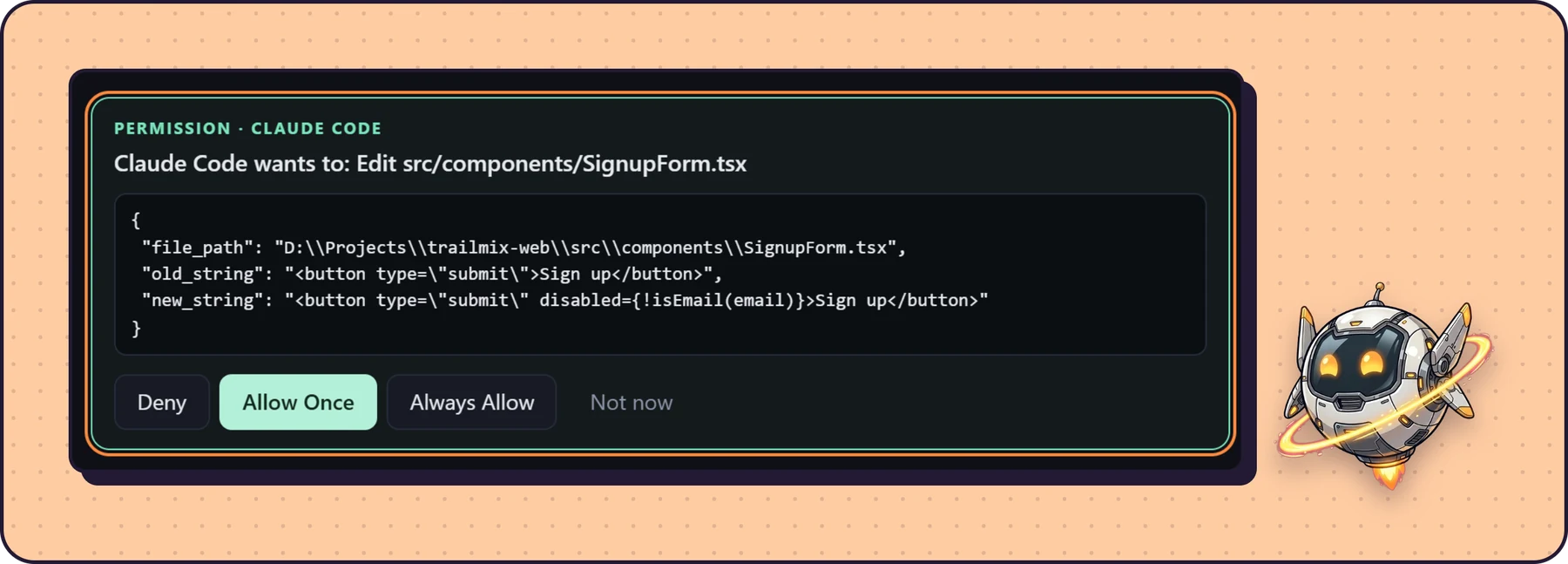
The companion Chrome extension gives an agent access to its own tabs and tabs you explicitly share. Other tabs remain outside that scope. This can bring an approved task into a signed-in website without treating your entire browser session as the agent’s workspace.
MjPetz’s privacy policy explains the limits. Cloud agents still send requests to their providers. Shared-channel messages travel between participants, while update and Pro-license checks involve network requests. Offline only disables MjPetz’s own online features; it is not a firewall for the whole computer. Those distinctions matter more than an absolute promise that nothing ever leaves the machine.
Four games make the waiting time more interesting
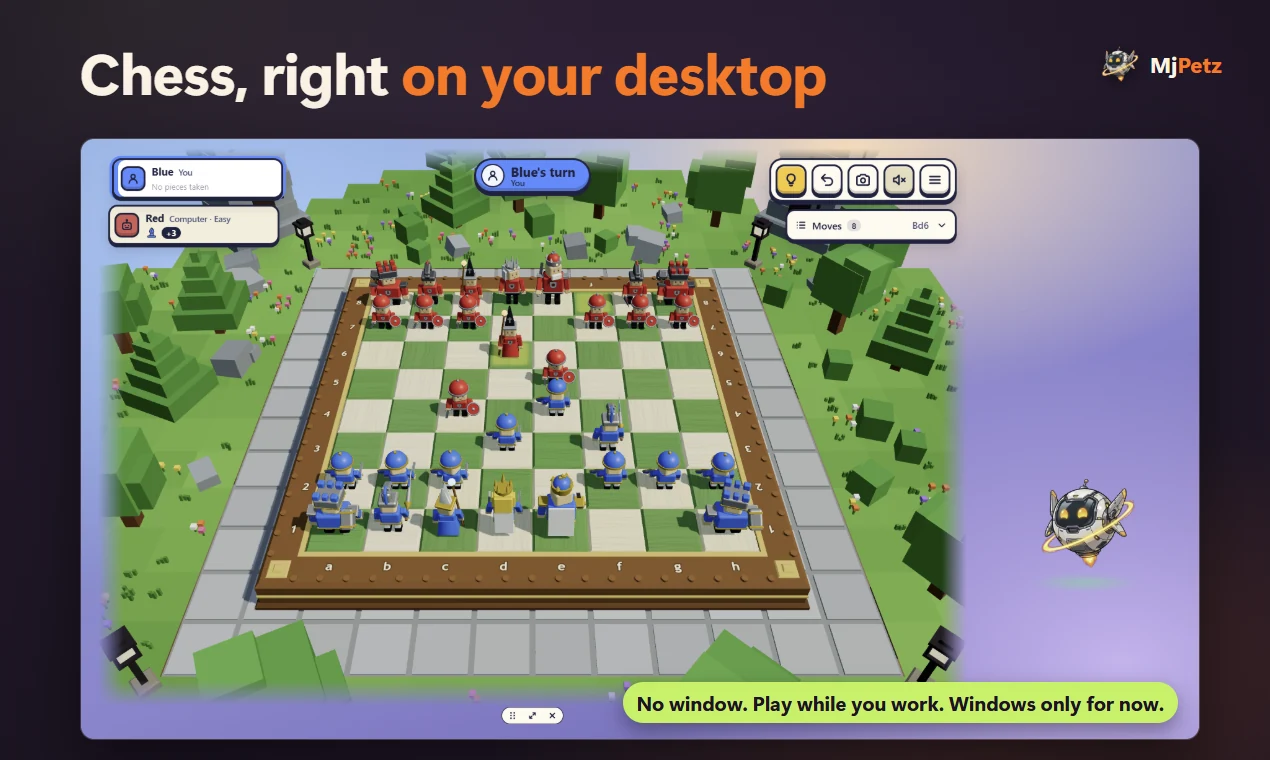
Block Brawl Chess is the standout visual departure from a conventional AI workspace. A 3D board floats above the Windows desktop, populated by toy-like fighters whose captures become short battles. It includes five computer difficulty levels, local two-player play, lessons and missions. This is same-computer multiplayer, not a claim of online matchmaking.
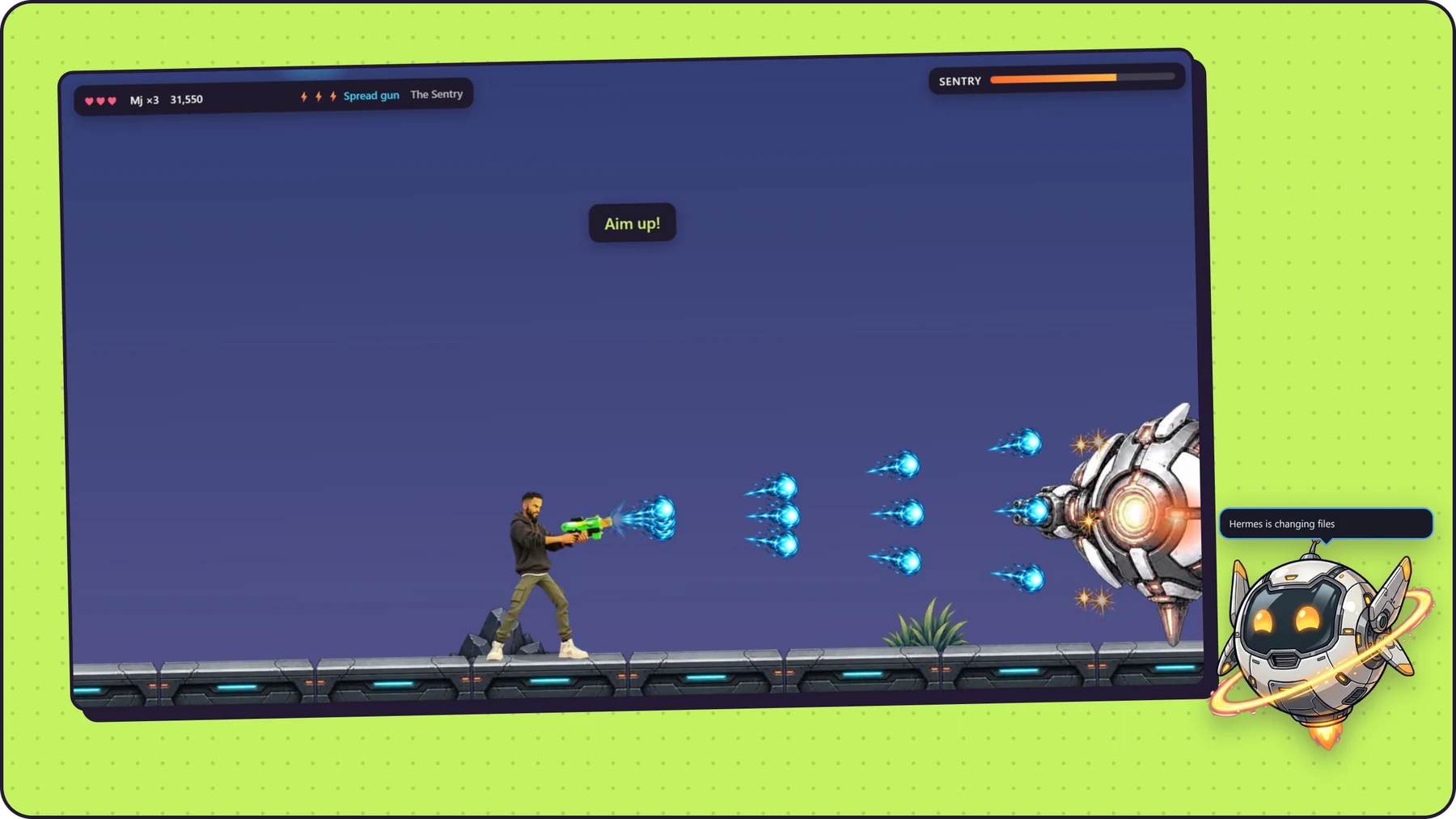
Mj: Desktop Run & Gun takes a different approach: anime Mj runs, jumps and fires in 8 directions over your desktop. It supports keyboard or controller input, and Ctrl+Alt+H hides it. Your agents can continue their work while you play, although running a game does not make an AI job finish faster.
The free games are Orb Catcher and Song Bird. The former pairs falling objects with dodging and combos; the latter sends a bird through obstacles in its own small window. Together, the four games give MjPetz a leisure side without requiring it to become your full-screen gaming environment.
Free versus Pro: what the $8.99 buys
The pricing is one of MjPetz’s strongest decisions. Core agent chat, the built-in brains and call notes stay free. Pro puts the paid boundary around additional characters and two games, rather than charging to unlock the basic reason to use the app.
| Option | What you get | Important limits |
|---|---|---|
| MjPetz Free | Agent workspace, local brains, call notes, Orbit and Fader, Orb Catcher and Song Bird | Your chosen cloud agents can have separate charges and usage limits; local models need downloads and suitable hardware |
| MjPetz Pro | Seven extra characters, Block Brawl Chess and Mj: Desktop Run & Gun | US$8.99 once, tax included; currently sold only in the United States; one license covers up to 3 of your own computers; chess currently requires Windows |
Each Pro character and game has a 10-minute trial. Purchases have a full-refund window of 14 days. The current license covers the public beta and version 1 releases; it should not be stretched into a promise that every future major version will be included. Check the current terms before buying.
What holds it back, and who should try it
MjPetz is still a public beta. Its release notes describe continuing fixes to chat, approvals and pet behavior. That pace is encouraging, but it also means the product is still settling. Keep separate copies of important work and review what an agent changes.
Platform differences also matter. The public download page currently lists version 0.7.59 for Windows 10/11, Apple-silicon Macs and x86-64 Linux. Intel Macs are not supported yet. The Linux builds are unsigned and have only been tried on Kali Linux so far. Mac and Linux updates require downloading and replacing the installed version. Mini’s published testing coverage is Windows, and chess is Windows-only.
Our creator’s score weighs the breadth of the workspace, the character design, useful coordination features and the free core against those beta and platform limitations. It is not a security certification, a model-speed benchmark or an independent comparison with every competing agent interface. The illustrated conversations do not establish coding success rates.
If you only ask one assistant an occasional question, there may be more here than you need. If you routinely move between agents, want a local option or like building small tools around your workflow, the proposition is much stronger. Readers exploring collaborative AI can also see our coverage of Perplexity Teammates for a different, web-focused approach.
MjPetz’s appeal is that it gives serious agent work a place on the desktop without making the desktop feel quite so serious. Start with the free download, connect the tools you already use or try a local brain, and use the Pro trials to judge the extras. The workflow is the reason to stay; the pets make it easier to enjoy being there.